错误处理
错误可分为两类: 预期错误 和 未捕获错误:
- 将预期错误自定义为返回值: 避免在服务器操作中使用
try/catch表示预期错误。 使用useActionState来管理这些错误并将它们返回到客户端。 - 对意外错误使用错误边界: 使用
error.tsx和global-error.tsx文件执行错误边界来处理意外错误并提供回退 UI.
处理预期错误
预期错误是能够在应用程序正常操作期间发生的错误,例如来自服务器端表单验证或失败请求。应该详细处理这些错误并返回到客户端。
处理服务器操作中的预期错误
使用 useActionState hook (以前是 useFormState) 管理服务器操作的状态, 包括错误处理。 这种方式避免try/catch块阻止预期错误, 这些错误应该被包装为返回值而不是抛出异常。
"use server";

import { redirect } from "next/navigation";

export async function createUser(prevState: any, formData: FormData) {
  const res = await fetch("https://...");
  const json = await res.json();

  if (!res.ok) {
    return { message: "Please enter a valid email" };
  }

  redirect("/dashboard");
}
"use server";

import { redirect } from "next/navigation";

export async function createUser(prevState, formData) {
  const res = await fetch("https://...");
  const json = await res.json();

  if (!res.ok) {
    return { message: "Please enter a valid email" };
  }

  redirect("/dashboard");
}
然后,您能够向useActionState hook 传递您的 action 并使用此返回的状态来展示错误信息。
"use client";

import { useActionState } from "react";
import { createUser } from "@/app/actions";

const initialState = {
  message: "",
};

export function Signup() {
  const [state, formAction] = useActionState(createUser, initialState);

  return (
    <form action={formAction}>
      <label htmlFor="email">Email</label>
      <input type="text" id="email" name="email" required />
      {/* ... */}
      <p aria-live="polite">{state?.message}</p>
      <button>Sign up</button>
    </form>
  );
}
"use client";

import { useActionState } from "react";
import { createUser } from "@/app/actions";

const initialState = {
  message: "",
};

export function Signup() {
  const [state, formAction] = useActionState(createUser, initialState);

  return (
    <form action={formAction}>
      <label htmlFor="email">Email</label>
      <input type="text" id="email" name="email" required />
      {/* ... */}
      <p aria-live="polite">{state?.message}</p>
      <button>Sign up</button>
    </form>
  );
}
您也能够使用返回的状态来显示来自客户端组件的 Toast 消息。
处理服务器组件的预期错误
在服务器组件内获取数据时,您能够使用响应有条件地渲染一个错误信息或重定向.
export default async function Page() {
  const res = await fetch(`https://...`);
  const data = await res.json();

  if (!res.ok) {
    return "There was an error.";
  }

  return "...";
}
export default async function Page() {
  const res = await fetch(`https://...`);
  const data = await res.json();

  if (!res.ok) {
    return "There was an error.";
  }

  return "...";
}
未捕获的异常
未捕获的异常表面在您的应用程序正常流程中不应该发生的意外错误或 bug。它们应该由抛出错误来处理,然后错误边界会捕获这些错误。
- Common: 使用
error.js处理根布局下未捕获的错误。 - Optional: 使用嵌套的
error.js文件处理未捕获的颗粒错误。 (e.g.app/dashboard/error.js) - Uncommon: 使用
global-error.js处理根布局中未捕获的错误。
使用错误边界
Next.js 使用错误边界来错误未捕获的异常。错误边界在它们的子组件中捕获错误并展示回退 UI,而不是崩溃的组件树。
Create an error boundary by adding an error.tsx file inside a route segment and exporting a React component:
通过在路由段中添加一个error.tsx文件并且输出一个 React 组件来创建错误边界。
"use client"; // Error boundaries must be Client Components

import { useEffect } from "react";

export default function Error({
  error,
  reset,
}: {
  error: Error & { digest?: string };
  reset: () => void;
}) {
  useEffect(() => {
    // Log the error to an error reporting service
    console.error(error);
  }, [error]);

  return (
    <div>
      <h2>Something went wrong!</h2>
      <button
        onClick={
          // Attempt to recover by trying to re-render the segment
          () => reset()
        }
      >
        Try again
      </button>
    </div>
  );
}
"use client"; // Error boundaries must be Client Components

import { useEffect } from "react";

export default function Error({ error, reset }) {
  useEffect(() => {
    // Log the error to an error reporting service
    console.error(error);
  }, [error]);

  return (
    <div>
      <h2>Something went wrong!</h2>
      <button
        onClick={
          // Attempt to recover by trying to re-render the segment
          () => reset()
        }
      >
        Try again
      </button>
    </div>
  );
}
如果您希望错误向上冒泡到父错误边界, 你能够在渲染错误组件的时候throw错误。
处理嵌套路由中的错误
错误将冒泡到最近的父错误边界。这允许通过将error.tsx文件放置在路由层次结构中的不同的层级来处理错误。
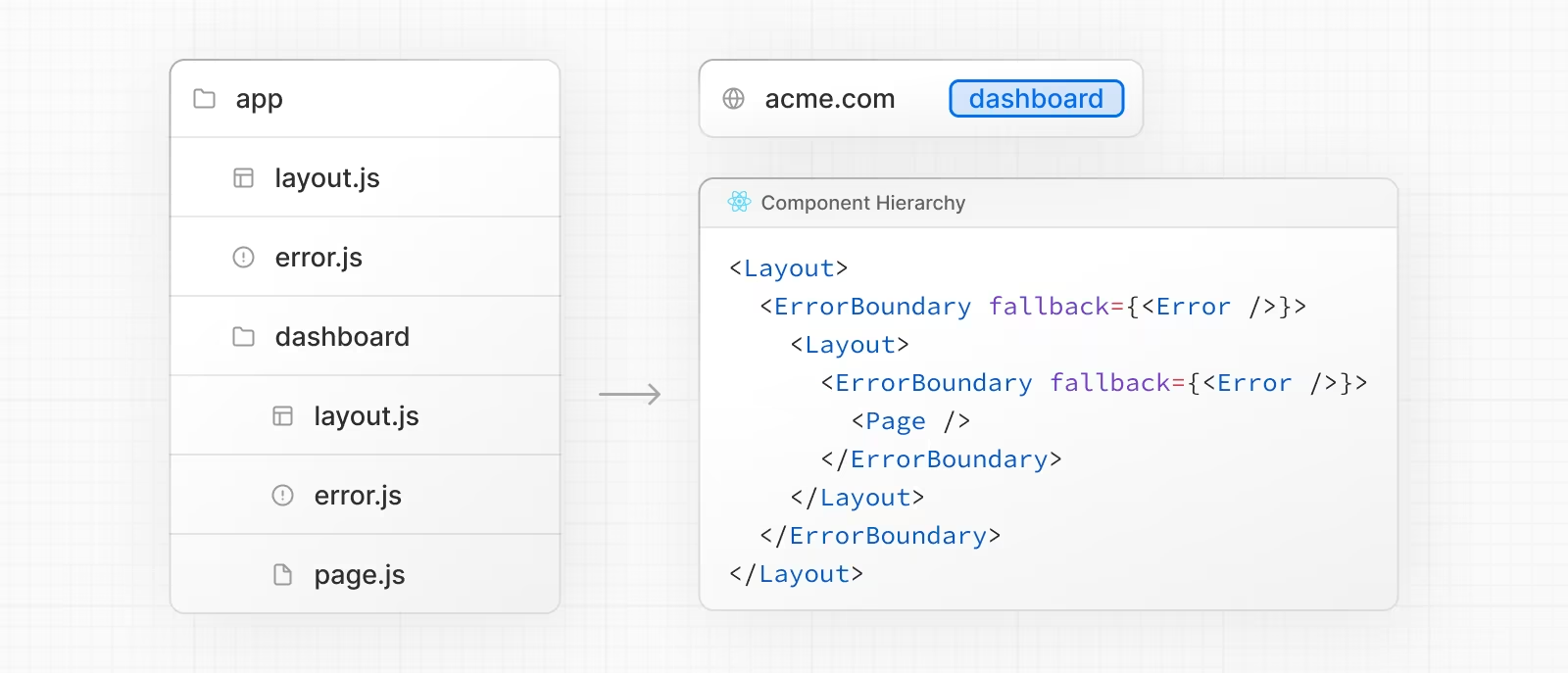
处理全局错误
虽然很少见, 您可以在根布局中使用app/global-error.js来处理错误,其位于根路径的 app 文件夹中, 即使在使用 国际化时也是如此。全局错误 UI 必须定义它自己的<html> 和 <body> 标签, 因为在激活时它会替换掉根布局或模版。
"use client"; // Error boundaries must be Client Components

export default function GlobalError({
  error,
  reset,
}: {
  error: Error & { digest?: string };
  reset: () => void;
}) {
  return (
    // global-error must include html and body tags
    <html>
      <body>
        <h2>Something went wrong!</h2>
        <button onClick={() => reset()}>Try again</button>
      </body>
    </html>
  );
}
"use client"; // Error boundaries must be Client Components

export default function GlobalError({ error, reset }) {
  return (
    // global-error must include html and body tags
    <html>
      <body>
        <h2>Something went wrong!</h2>
        <button onClick={() => reset()}>Try again</button>
      </body>
    </html>
  );
}