部分预渲染
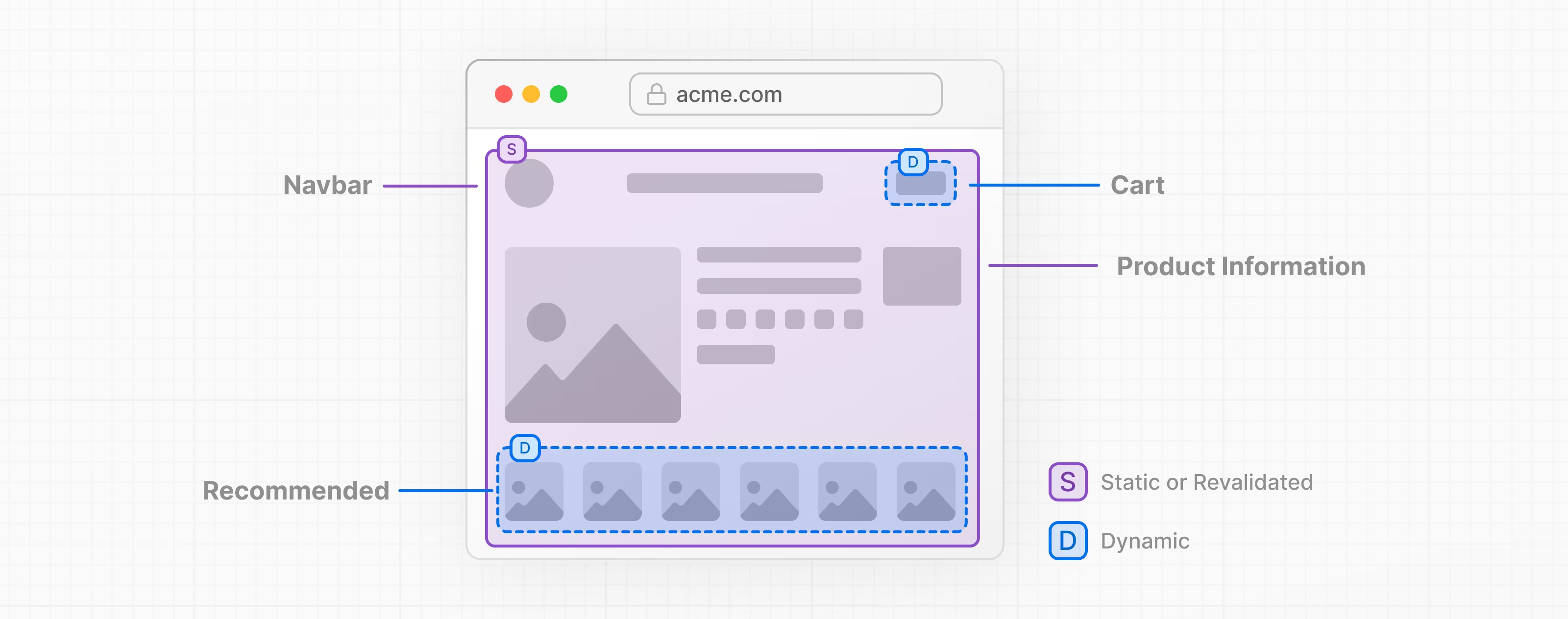
部分预渲染(PPR) 使您能够在同一路由中将静态和动态组件组合。
在构建过程中,Next.js 会尽可能多地预渲染路由。如果检测到动态代码(例如从传入的请求中读取的),则可以使用React Suspense边界包装相关的组件。然后,Suspense 边界备用将被包含在预渲染的 HTML 中。
注意: 部分预渲染是一项实验性 功能并且可能会改变。它还不能用于生产使用。
🎥 观看: 为什么使用 PPR 以及它的工作原理 → YouTube (10 分钟).
背景
PPR 使 Next.js 服务器能够立即发送预渲染的内容。
为了防止客户端到服务器的瀑布流,动态组件在提供初始预渲染的同时开始并行的从服务器流式传输。这确保了在浏览器加载完客户端 JavaScript 之前动态组件就能够开始渲染。
为了防止为每个动态组件创建许多 HTTP 请求,PPR 能够将静态预渲染和动态组件组合到单个 HTTP 请求中。这确保了每个动态组件不需要多次网络往返。
使用部分预渲染
逐步采用 (版本 15)
在 Next.js 15 中, 您可以通过在next.config.js中将ppr选项设置为incremental并且在文件顶部导出experimental_ppr 路由配置选项以在layouts 和 pages中逐步采用部分预渲染。
import type { NextConfig } from "next";

const nextConfig: NextConfig = {
  experimental: {
    ppr: "incremental",
  },
};

export default nextConfig;
/** @type {import('next').NextConfig} */
const nextConfig = {
  experimental: {
    ppr: "incremental",
  },
};

module.exports = nextConfig;
import { Suspense } from "react"
import { StaticComponent, DynamicComponent, Fallback } from "@/app/ui"

export const experimental_ppr = true

export default function Page() {
  return {
     <>
      <StaticComponent />
      <Suspense fallback={<Fallback />}>
        <DynamicComponent />
      </Suspense>
     </>
  };
}
import { Suspense } from "react"
import { StaticComponent, DynamicComponent, Fallback } from "@/app/ui"

export const experimental_ppr = true

export default function Page() {
  return {
     <>
      <StaticComponent />
      <Suspense fallback={<Fallback />}>
        <DynamicComponent />
      </Suspense>
     </>
  };
}
您需要知道:
- 没有
experimental_ppr的路由将默认为false并且不能使用 PPR 预渲染。你需要明确地为每个路由选择加入 PPR。experimental_ppr将应用到路由段的所有子段, 包括嵌套的 layouts 和 pages。您不需要将它添加到每个文件,只需要在路由的顶部段添加即可。- 要为子组件禁用 PPR, 您可以在字段中将
experimental_ppr设置为false。
启用 PPR (版本 14)
对于版本 14, 您可以通过在next.config.js文件中添加ppr选项来启用它。这将应用于应用程序中的所有路由:
import type { NextConfig } from "next";

const nextConfig: NextConfig = {
  experimental: {
    ppr: true,
  },
};

export default nextConfig;
/** @type {import('next').NextConfig} */
const nextConfig = {
  experimental: {
    ppr: true,
  },
};

module.exports = nextConfig;
动态组件
当在next build期间为路由创建预渲染时,Next.js 需要使用 React Suspense 包裹动态函数。然后fallback将包含在预渲染中。
例如, 使用函数,例如:cookies() 或 headers():
import { cookies } from "next/headers";

export function User() {
  const session = cookies().get("session")?.value;
  return "...";
}
import { cookies } from "next/headers";

export function User() {
  const session = cookies().get("session")?.value;
  return "...";
}
该组件需要查看传入的请求以读取 cookie。要将其与 PPR 一起使用, 您应该使用 Suspense 包裹这个组件:
import { Suspense } from "react";
import { User, AvatarSkeleton } from "./user";

export const experimental_ppr = true;

export default function Page() {
  return (
    <section>
      <h1>This will be prerendered</h1>
      <Suspense fallback={<AvatarSkeleton />}>
        <User />
      </Suspense>
    </section>
  );
}
import { Suspense } from "react";
import { User, AvatarSkeleton } from "./user";

export const experimental_ppr = true;

export default function Page() {
  return (
    <section>
      <h1>This will be prerendered</h1>
      <Suspense fallback={<AvatarSkeleton />}>
        <User />
      </Suspense>
    </section>
  );
}
组件只在访问值时才选择动态渲染。
例如, 如果您正从一个page读取searchParams时, 您可以将该值作为属性传递给另一个组件:
import { Table } from "./table";

export default function Page({
  searchParams,
}: {
  searchParams: { sort: string };
}) {
  return (
    <section>
      <h1>This will be prerendered</h1>
      <Table searchParams={searchParams} />
    </section>
  );
}
import { Table } from "./table";

export default function Page({ searchParams }) {
  return (
    <section>
      <h1>This will be prerendered</h1>
      <Table searchParams={searchParams} />
    </section>
  );
}
在 table 组件内部, 访问searchParams中的值将使组件动态运行:
export function Table({ searchParams }: { searchParams: { sort: string } }) {
  const sort = searchParams.sort === "true";
  return "...";
}
export function Table({ searchParams }: { searchParams: { sort: string } }) {
  const sort = searchParams.sort === "true";
  return "...";
}